9Ubet Login
Your 9Ubet account opens with your registered mobile number and password. The login form is short, and most access problems have a quick solution. This guide explains the security options, password recovery and common error messages. Log in now to return to your bets, casino games and current promotions.
- BCLB licences BK-0001295 & PG-0001060
- Paybill 989878
- Support 24/7
9Ubet Login Security Settings
9Ubet protects account access with your password and SMS verification during password recovery. You can add further protection through a strong password and careful use of the login options.
| Security element | Purpose |
|---|---|
| Mobile number | Identifies your account at login |
| Password | Confirms your access |
| SMS code | Verifies you during password recovery |
| Keep me logged in | Keeps your session open on your device |
Keep Me Logged In Option
The Keep me logged in option saves you from entering your details at each visit. You can find this checkbox below the Password field on the login form.
Tick it only on a phone that you alone use. This gives you quicker access to your account without reducing your control over it. On any other device, leave the box empty.
Password Requirements
Your 9Ubet password needs a mix of letters and numbers. It must also meet the minimum length shown on the screen.
Follow these rules when you choose a password:
- Use a password that is unique to 9Ubet.
- Avoid your name, birth date or phone number.
- Choose something that is easy for you to remember.
- Do not share it with anyone.
If the form rejects a new password, note the exact error message. Support can use it to check the problem.
Account Protection on Shared Devices
On a shared device, leave Keep me logged in empty and log out after your session. These two steps stop the next user from opening your account.
Also avoid saving your password in a shared browser. Never share your SMS codes or M-PESA PIN, including with anyone who says that they represent support.
9Ubet Account Access
You can access your account through 9Ubet.co.ke or the Android app. Both use the same registered number and password.
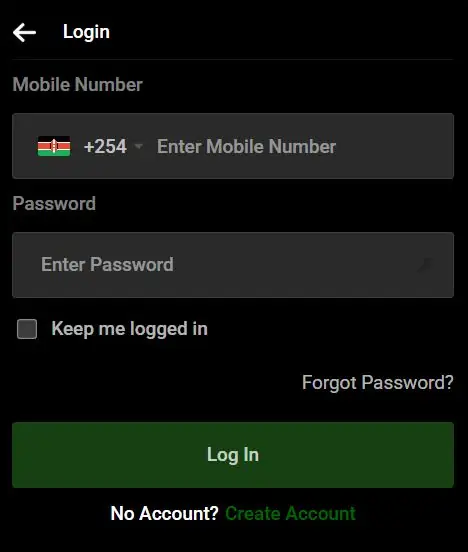
- Open 9Ubet.co.ke or the 9Ubet app.
- Tap Login.
- Enter your registered mobile number after +254.
- Enter your password.
- Tap Log In.
After login, you can make a deposit, place bets, open casino games and check your bet history. You can also review your bonus records and request withdrawals.
9Ubet Password Recovery Procedure
You can recover your password yourself with an SMS code sent to your registered number. You need access to that SIM to complete the procedure.
- Tap Forgot Password? on the login form.
- Enter your registered mobile number.
- Enter the verification code from the SMS.
- Choose a new password.
- Log in with your new details.
If you still cannot log in after the reset, tell support the exact message on your screen.
9Ubet Login Errors and Solutions
Most login errors come from incorrect details or a delayed SMS. The steps below can help you return to your account quickly.
| Message or problem | First step |
|---|---|
| User not found | Check your registered number |
| Invalid credentials | Retype your details or reset your password |
| SMS code does not arrive | Check your number and network signal |
User Not Found Message
A "user not found" message means that the system cannot find an account with the number you entered. A mistyped digit or a different line is a common cause.
Check the number and try again. If you use more than one line, try the number you used for registration. If the message remains, send support your registered number.
Invalid Credentials Message
An "invalid credentials" message means that the system did not accept your number or password. Retype both carefully, then try again.
If you are unsure about the password, use Forgot Password? to create a new one. Contact support if the message remains after the reset.
Undelivered SMS Verification Code
An undelivered code usually points to an incorrect number or a weak network signal. Check both before you request another code.
- Confirm that you entered your registered number.
- Make sure that your SIM is active and has coverage.
- Check your SMS inbox.
- Request the code again if the option is available.
If the code still does not arrive, contact customer care with your registered number.
9Ubet Customer Care
9Ubet customer care is available 24/7 and can help you restore access to your account. You can choose the channel that suits you best.
| Channel | Contact |
|---|---|
| Phone | +254 709 549 599 |
| +254 113 499 999 | |
| support@9Ubet.com |
Have your registered number and a screenshot of the error ready. Once your access is restored, you can continue with your bets and promotions. Remember to play within your budget.
FAQ
These short answers cover the most common questions about 9Ubet login.
Which details do I need to log in?
You need your registered mobile number and your password. There is no separate username.
How do I reset my 9Ubet password?
Tap Forgot Password? and enter your registered number. Enter the SMS code and choose a new password.
Why does 9Ubet show a user not found message?
The system cannot find an account with the number you entered. Check for typing errors and confirm that you used your registered number.
Can I use one account on the app and the website?
Yes, the same account works on the app and the website. Use the same number and password on both.
What information does support need to restore access?
Support needs your registered mobile number and the exact error message. A screenshot of the error can also help.